Building Distributable Binaries
The Companion repo allows you to build a distributable binary from sources by running
yarn dist
You can also cross-build for a specific platform using one of the following:
- Desktop Linux:
yarn lindist - Raspberry Pi:
yarn rpidist - Windows:
yarn windist - macOS intel:
yarn macdist - macOS Apple silicon:
yarn macarmdist
The build will be added to a sub-directory of electron-output/ named xxx-unpacked. For example electron-output/linux-unpacked or electron-output/win-unpacked.
There you will find a binary to run a Headed build (a system with a monitor, keyboard, and mouse). On Windows it is named Companion.exe on linux it is named companion-launcher
Windows builds also include an installer program named companion-win64.exe in electron-output/ (not electron-output/win-unpacked!), which can be distributed independently of the "unpacked" contents.
Linux builds include a shell script to run headless named companion_headless.sh
You can also start a "headless" run manually by running main.js from xxx-unpacked/resources, i.e.:
./node-runtimes/main/bin/node main.js
To build Windows distributables from Linux systems (even WSL) you must install Wine first:
sudo apt install wine
sudo bash -c “dpkg --add-architecture i386 && apt-get update && apt-get install wine32:i386”
note: if your wine config gets corrupted, delete ~/.wine.
The very end of ‘yarn dist’ (signing) creates symlinks. By default, Windows restricts symlink creation, so this step will fail. You have three options to allow building Companion in Windows:
-
Run
yarn distin a shell with Administrator privileges. -
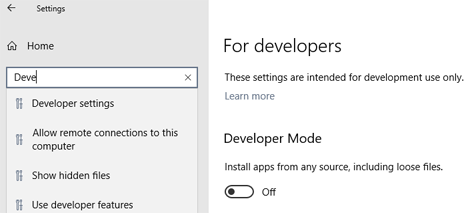
Turn on Developer Mode in Windows Settings. (Open Settings and search for "developer"):
-
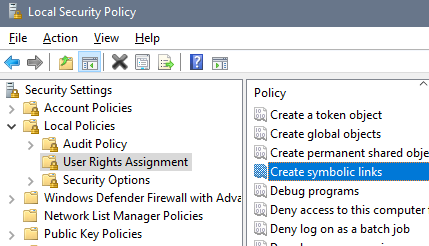
Set a local policy in the “Local Security Policy” editor: Security Settings > Local Policies > User Rights Assignment: Create symbolic links, to allow yourself to create symlinks:
Windows Antimalware Executable can slow down build times by 50-100%. You can improve performance by excluding certain folders: After cloning the companion repo and running yarn install the first time (see Developing Core Companion) go to Windows Security > Virus and Threat Protection > Exclusions and add node_modules from your companion root. For completeness and a slight additional boost add: cache, dist, electron-output, shared-lib\dist, webui\build, and companion\dist.
You may want/need to exclude these folders from backup apps too.
It is not recommended to run Companion on a Raspberry Pi with the desktop environment installed.