Bonjour Device Discovery
Bonjour is a standardised method of device discovery, utilising MDNS.
Starting with API 1.7 (Companion 3.2), Companion allows you to easily discover devices using the Bonjour protocol, thus helping users with configuration.
Setting up Bonjour
You can do this by defining a config field such as:
{
	type: 'bonjour-device',
	id: 'bonjour_host',
	label: 'Bonjour Test',
	width: 6,
},
and in your companion/manifest.json:
	"bonjourQueries": {
		"bonjour_host": {
			"type": "blackmagic",
			"protocol": "tcp",
			"txt": {
				"class": "AtemSwitcher"
			}
		}
	}
These two structures are linked by the common id, in the future this will allow us to automate device discovery further.
In the UI, this field will look like:
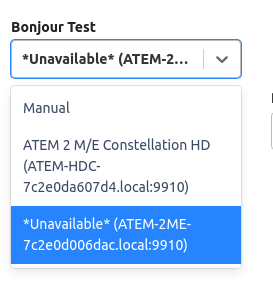
The 'Manual' option is always shown, and must be handled to allow users to manually specify an address for environments where Bonjour does not work.
This can be achieved with further config fields such as:
{
	type: 'textinput',
	id: 'host',
	label: 'Target IP',
	isVisibleExpression: `!$(options:bonjour_host)`,
	default: '',
	regex: Regex.IP,
},
Note the presence of the isVisibleExpression, to control the visibility of the fields depending on whether a bonjour discovered device has been selected.
In your module code, the bonjour_host will have a value such as 10.0.0.1:8000 or null.
Writing your Bonjour Query
We currently support a subset of the possible query options. In all queries, the type and protocol must be set.
If your device needs further filtering, this can be done by specifying any txt field values the entries must have.
Since API 1.10 each entry in the manifest under bonjourQueries can be an array, to allow you to run multiple queries in parallel. This can be useful when supporting multiple models which use slightly different queries
Since API 1.12 it is possible to filter by port number in the query. It is recommended to only use this as a last resort, as port numbers are often configurable.
Since API 2.0 it is possible to specify an addressFamily for the query. This allows you to specify whether ipv4, ipv6 or both (ipv4+6) addresses are returned by the query.